

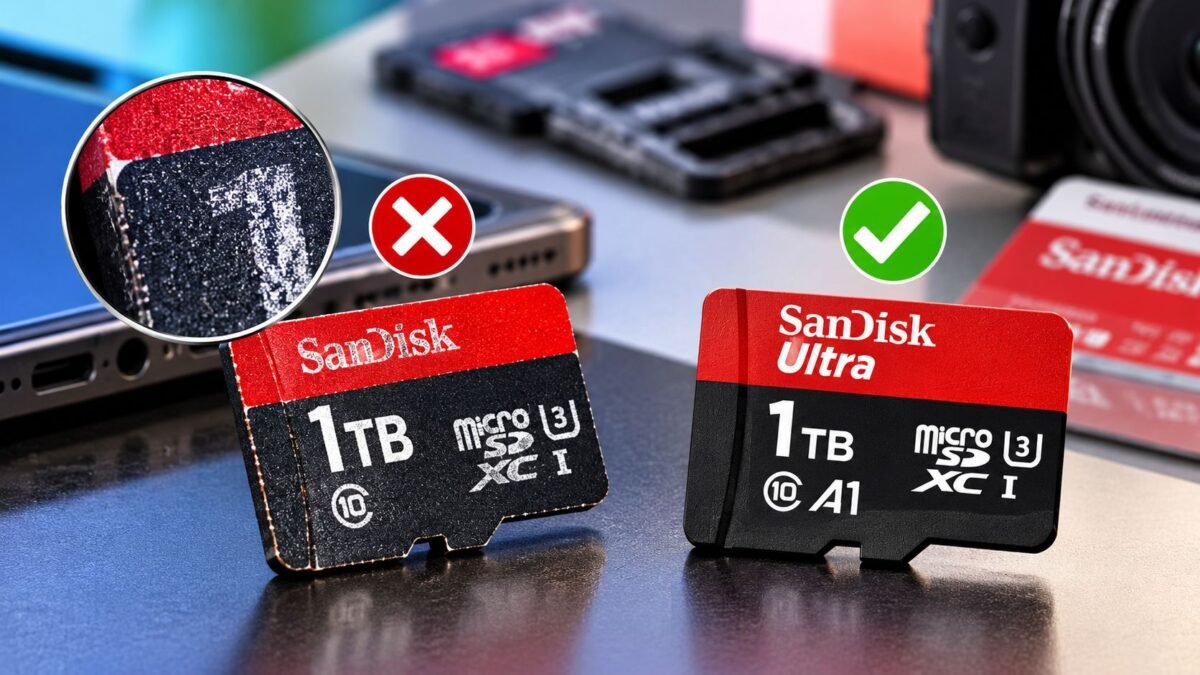
A fake memory card is a microSD card or flash drive whose controller has been reprogrammed to report far more storage than the chip inside actually holds, so a “1TB” card might only store 32GB before it starts quietly overwriting your files. Your phone or laptop will happily show the fake capacity, which is why the only reliable way to catch one is to fill it with test data and read every byte back.
In Nigeria these cards turn up wherever storage is sold cheaply, from market stalls to online listings, and they’re often packaged to look like SanDisk, Samsung or Kingston products. The good news is that you don’t need special equipment to protect yourself. A free test on a laptop and a few checks at the point of sale will tell you whether the card in your hand is worth keeping, and the steps below work for microSD cards, full-size SD cards and USB flash drives.
Why your phone can’t spot a fake memory card on its own
When you insert a card, the phone asks the card’s controller how big it is and believes the answer. A counterfeit controller lies, so Settings > Storage will show 512GB or 1TB even when the real flash is a fraction of that. Everything looks fine at first because the first few gigabytes are real, and the trouble only starts once you’ve copied past the true capacity. At that point new files either fail to save or overwrite older ones, and you usually find out when photos from a wedding or a trip open as grey blocks.
This works the same way as the capacity tricks on cheap power banks, which we covered in our guide on checking whether a power bank holds what it claims. In both cases the label and the on-screen number are the parts that are easiest to fake, so you have to test what the device actually delivers.
Test the card on a laptop before you trust it with anything
Two free tools do this job well. On Windows, H2testw writes test files across the whole card and then reads them back, reporting how much of the space is genuine. On macOS and Linux, F3 does the same thing with its f3write and f3read commands. Run the test on an empty card, because the tool needs to fill all of it, and expect it to take a while (a large card can need several hours on a slow USB reader).
A genuine card finishes with no errors and a usable capacity close to the advertised figure. Formatted capacity is always a bit lower than the label, so a 128GB card showing around 119GB is normal. A fake one reports a large block of corrupted or lost data, and the “OK” figure tells you roughly what the chip really holds. If the test fails, stop using the card for anything you care about and go back to the seller while you still have your receipt.
What the markings on a genuine card should tell you
The symbols on a real card follow standards set by the SD Association, and knowing what they mean helps you buy the right card as well as avoid a fake. A Class 10 or U1 mark promises a minimum sequential write of 10MB/s, which is fine for photos and 1080p video. U3 and V30 both guarantee at least 30MB/s, which is what you want for 4K recording on a phone, action camera or drone. If the card is going into a phone that lets you install apps on it, the A1 mark matters because it sets a minimum for the small random reads and writes apps rely on, and A2 cards only deliver their extra speed in a phone that also supports A2.
Don’t treat these markings as proof on their own, though. Counterfeiters print logos as easily as they print capacity, which is why the test above is the step that settles it. Markings are best used the other way round, to make sure a genuine card you’re paying for actually suits what you’ll record.
Flash drives fail the same way, so test those too
USB flash drives use the same kind of controller, and fake-capacity drives are just as common. The same H2testw or F3 test works on them, and it’s worth running before you trust one with project files, a school assignment or a Windows installer. A drive that gets unusually hot, drops its connection mid-copy or shows a capacity that seems too good for its price deserves the full test straight away.
We haven’t included naira prices here because card and drive prices change often and vary a lot between sellers, and a fake can be priced to look like a bargain on a genuine model. If you’re also shopping for accessories that are commonly copied, our guides to checking whether earbuds are genuine and spotting a fake phone charger use the same approach. The practical aim isn’t to distrust every card you see, it’s to test once on the day you buy, so your photos and files never end up on storage that was never really there.




Join the conversation