

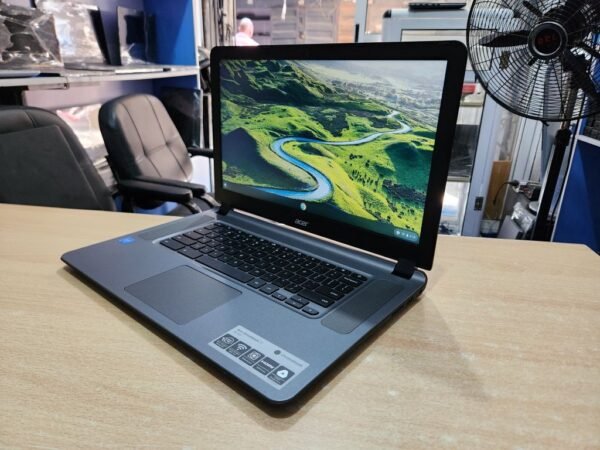
A UK-used Chromebook in Nigeria can be one of the cheapest ways to get a working laptop for school, but whether it’s a bargain or a dead end comes down to the date Google stops updating it and whether it’s still locked to the school or company that first owned it. Google gives Chromebooks 10 years of automatic updates counted from the platform’s release date, not from the day you buy one, so an older unit can arrive in Lagos or Abuja with very little support left.
That matters right now because a lot of students are shopping for a first laptop as the 2026/2027 admission season picks up. The good news is that you can check both problems in a few minutes before you pay, and you don’t need any special tools to do it.
| Update period | 10 years from the platform's release date |
|---|---|
| Where to check | Settings > About ChromeOS > Additional details > Update schedule |
| Pre-2021 models | Extended updates available on eligible units, but Android apps stop working |
| School or office units | Can re-enrol to the old owner after a reset unless they release it |
| Naira price | Not confirmed |
Start with the update date, because it decides how long your Chromebook stays safe
Ask the seller to switch the Chromebook on and sign in (guest mode works if it’s allowed), then open Settings > About ChromeOS > Additional details and look at the Update schedule section. Google says this is where you’ll see when your Chromebook will receive its last update. If the date is only a few months away, the price should reflect that, because you’re buying a laptop that will soon stop getting security fixes.
A Chromebook doesn’t stop working on that date, but it does stop improving. Once support ends, Google’s own notice reads “This device will no longer receive software updates. You can continue using your computer but should consider upgrading.” For a student who’ll be logging into school portals, internet banking and email for four years, that isn’t a small thing, so aim for a unit with at least three or four years of updates left.
Be careful with models released before 2021. Some of them can switch to extended updates to reach the full 10 years, but Google says devices on extended updates “will no longer have the ability to run Android apps”, and the switch can’t be reversed. If you were counting on WhatsApp, Canva or other Play Store apps running on the Chromebook, that trade-off should shape which model you pick.
The school lock that a factory reset won’t remove
Chromebooks are common in schools and offices abroad, and those organisations usually enrol them in a management account. Google’s documentation for administrators explains that “by default, wiped ChromeOS devices automatically re-enroll into your account without users having to enter their username and password”, which means a reset doesn’t free the laptop. Only the original organisation can release it properly by deprovisioning the device, and a seller in Nigeria usually can’t arrange that for you.
Look at the sign-in screen and the system tray for a line saying the device is managed by a named organisation, and walk away if you see one. The safest test is to ask the seller to run a Powerwash in front of you by pressing Ctrl + Alt + Shift + R on the sign-in screen, then watch the setup. If it jumps to an enterprise enrolment screen or asks for a school email, the laptop is still tied to its old owner and you’ll run into restrictions or a locked screen later.
Is a Chromebook the right laptop for your course?
A Chromebook suits you if most of your work happens in a browser. Assignments in Google Docs or the web versions of Microsoft Word and Excel, research, email, school portals and video classes all run well, and ChromeOS tends to stay quick on modest hardware. It’s also harder to infect with the kind of malware that spreads through pirated Windows software, which is a real benefit on a shared hostel network.
It’s a poor fit if your department relies on Windows programmes such as AutoCAD, specialist statistics packages or offline CBT practice software, because those won’t install on ChromeOS. Engineering, architecture and some science students are usually better served by a Windows laptop, and our guide to checking Windows 11 support on a student laptop covers what to look for there. Since a Chromebook leans heavily on the internet, it also helps to plan for data costs and set up offline access in Google Docs before you need it.
Pros
- Simple to set up and easy to keep running
- Runs smoothly on modest hardware
- Automatic updates and built-in security while support lasts
- Good for Google Docs, Microsoft 365 on the web, portals and video classes
Cons
- Update date may already be close on older units
- School-managed units can stay locked to the old owner
- Windows-only software won't install
- Works best with a steady internet connection
What to do if the price looks too good
Naira prices for UK-used Chromebooks vary a lot from seller to seller and model to model, so we haven’t listed a price range here. A very low price is often a sign that the update date is close or the device is still managed, which is why the two checks above matter more than the price tag. If you’re weighing a Chromebook against a more powerful machine, our advice on buying a laptop in 2026 without getting stuck with 8GB and the checks for a UK-used MacBook will help you compare fairly.
The practical aim is to buy a Chromebook with enough update years left to see you through your programme and no link to a previous owner. If a seller won’t let you check the update schedule or run a Powerwash in front of you, take that as your answer and keep looking.


Join the conversation