

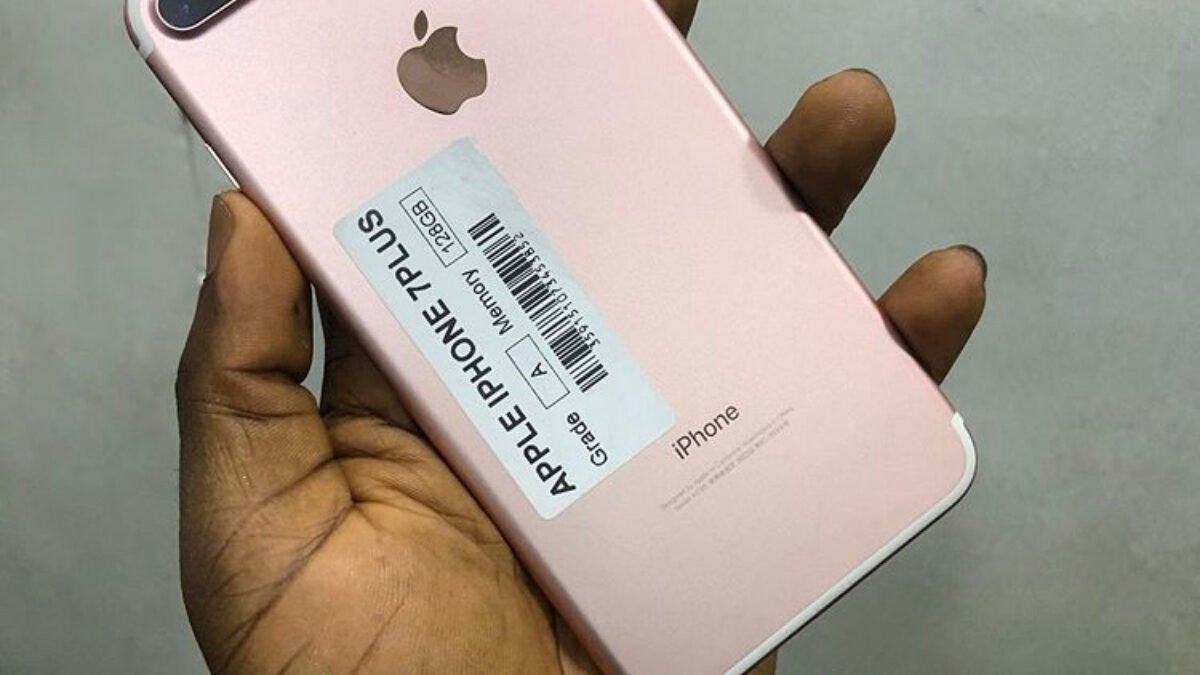
A UK-used iPhone in Nigeria is only a good buy if it still gets iOS 27, isn’t locked to someone else’s Apple Account and hasn’t had its screen or battery swapped for a non-genuine part. Apple’s iOS 27 compatibility list starts at the iPhone 11 and iPhone SE (2nd generation), so an iPhone XR, XS or anything older is already outside Apple’s current software support, however clean it looks.
The good news is that almost everything you need to check is built into the iPhone itself. You don’t need a special app or a paid IMEI service to spot the biggest problems, and you can do all of it in a few minutes at the seller’s shop in Ikeja, Wuse or wherever you’re buying. Start with the software support, then work through the checks below before any money changes hands.
| Oldest iPhones on iOS 27 | iPhone 11 series and iPhone SE (2nd generation) |
|---|---|
| No iOS 27 | iPhone XR, XS, XS Max and older |
| Full parts history | iPhone 12 and later: battery, display, logic board, front and rear cameras |
| Partial parts history | iPhone 11: battery and display. iPhone SE: battery only |
| Unlock status | Settings > General > About > Carrier Lock |
| Battery health | Settings > Battery > Battery Health |
Start with iOS 27 support before buying a UK-used iPhone in Nigeria
Software support is what keeps banking apps, WhatsApp and security fixes working, and it’s the part sellers rarely mention. The iPhone 11 series and the second-generation iPhone SE are the oldest models on Apple’s iOS 27 list, which means they’re also the likeliest to be dropped first when the next major update arrives. If you’re choosing between an iPhone 11 and an iPhone 12 at similar prices, the iPhone 12 is the safer long-term buy for that reason alone.
Check the actual model rather than trusting the listing. Open Settings > General > About and look at the Model Name, and while you’re on that screen, check the iOS version too. A phone that claims to be on iOS 27 but shows an older version may simply need updating, which is fine, but a seller who won’t let you look at this screen is a reason to walk away.
Parts and service history shows what the seller won’t tell you
UK-used iPhones often pass through repair shops before they reach Nigeria, and a replaced screen or battery isn’t always obvious from the outside. Apple’s parts and service history section, found under Settings > General > About, lists replaced parts on the iPhone 12 and later, covering the battery, display, logic board and cameras. On the iPhone 11 it only covers the battery and display, and on the second and third-generation iPhone SE it covers the battery alone.
A part marked Genuine was replaced with an Apple part using Apple’s process, which is fine. Be careful with Unknown, because Apple says it means the part isn’t genuine or isn’t working as expected, and with Used, which means the part came out of another iPhone. An Unverified logic board can affect features such as Apple Pay. Don’t accept a vague “it’s original” from the seller when the phone itself says otherwise.
Apple now also links some parts, including the battery, display and front camera, to the Apple Account of the phone they came from, so a part pulled from a locked iPhone can stay tied to that owner. Apple’s page on parts locked to someone else’s Apple Account says such a part will keep showing a Finish Repair label, isn’t covered by warranty and can only be released with the original owner’s login. If you see Finish Repair on a phone you’re about to buy, treat it as a serious red flag.
Activation Lock and carrier lock can turn a bargain into a paperweight
Apple’s own advice for buying a preowned iPhone tells you not to buy one if Activation Lock is on. When you turn the phone on, you should see either the Lock Screen or the Hello setup screen. If you see iPhone Locked to Owner, the previous owner’s Apple Account is still attached, and the seller needs to enter that password and erase the phone in front of you, because a seller who can’t do that doesn’t really control the phone.
Then check it’ll take your MTN, Airtel, Glo or T2 SIM. Apple says that if Settings > General > About shows No SIM restrictions next to Carrier Lock, the iPhone is unlocked. Put your own SIM in anyway and make a call before paying, since that’s the quickest proof. If you’re looking at a newer US model instead of a UK one, read our explainer on what eSIM-only iPhones mean in Nigeria first.
Battery health and IMEI round off the checks
Go to Settings > Battery > Battery Health and look at maximum capacity and any service message. A low figure isn’t a deal-breaker if the price reflects it, but you should budget for a genuine battery replacement, and our guide on checking a phone’s real battery health explains what the numbers mean. Finally, dial *#06# and make sure the IMEI matches the one in Settings, because a mismatch suggests the phone isn’t what it claims to be.
Buy it if
- You want an iPhone 12 or newer at a lower price than new
- The seller lets you check Settings, erase the phone and test your SIM
- The parts history shows Genuine parts or no replacements
Skip it if
- The phone is an iPhone XR, XS or older
- Activation Lock is on and the seller can't remove it
- Any part shows Unknown or Finish Repair
A UK-used iPhone can be good value in Nigeria, but only a model on iOS 27 with Activation Lock off, clean parts history and no SIM restrictions is worth your money.
If you’re weighing an Android alternative from the same UK-used market, our checklist for buying a UK-used Samsung Galaxy in Nigeria covers the checks that matter on that side, so you can compare the two on equal terms before deciding.

Join the conversation