

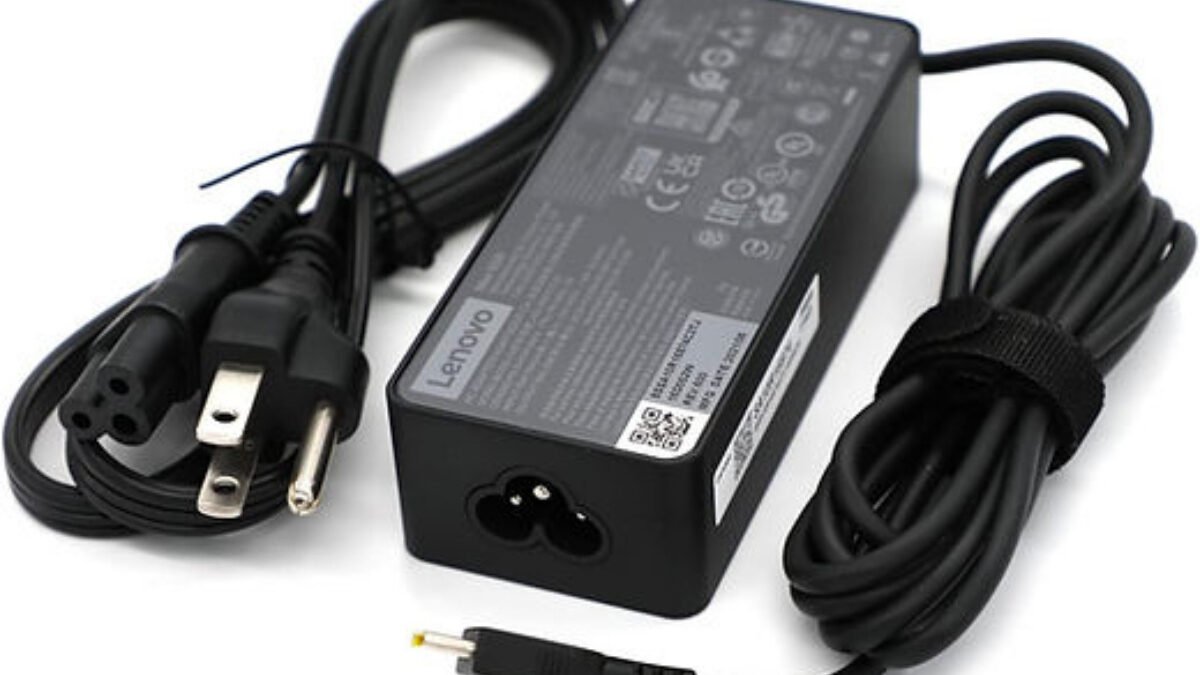
A replacement laptop charger in Nigeria has to match your laptop on three things, which are the output voltage, a wattage equal to or higher than the original, and the exact plug, and most charging problems after a replacement come from getting one of those wrong. The numbers you need are printed on your old charger’s label or on the underside of the laptop, so you can check them before you pay rather than after the laptop starts misbehaving.
That matters here because so many laptops in use are UK-used or bought without the original adapter, and the replacement often comes from a stand in Computer Village or a seller who matches by eye. The good news is that you don’t need to know electronics to get this right. Start with the label on your current charger, because every check below goes back to it.
Read your old laptop charger label before you go shopping
Look for the line marked Output on the charger brick. It will show a voltage and a current, for example 19.5V and 3.34A. Multiply the two and you get the wattage, so 19.5V at 3.34A is a 65W charger, while 19.5V at 4.62A is a 90W charger. If the old charger is missing, the laptop’s own label or its official support page usually lists the rating it expects.
The Input line matters less in Nigeria, because almost every modern laptop charger accepts 100–240V, which covers our mains supply. It’s still worth confirming, especially on a charger sold loose without a brand name, because a unit that only accepts a narrow input range has no business on a laptop that’ll be plugged in during voltage swings.
Voltage must match, but more watts won’t hurt your laptop
For a laptop with a round barrel plug, the output voltage on the replacement should be the same as the original. A 19.5V laptop wants a 19.5V charger, and a charger that’s even a few volts off can stop the laptop charging or put stress on its charging circuit. Don’t buy a “universal” charger and leave the voltage selector on whatever the seller set, because one wrong click on that switch is enough to cause damage.
Wattage works the other way round, since a charger with more watts than the original is safe because the laptop only draws the power it needs, so a 90W charger on a laptop that came with 65W is fine. A charger with fewer watts is the one to avoid. HP lists an underpowered charger as a common reason a laptop says it’s plugged in but not charging, and on its guide to laptop batteries that won’t charge it tells owners not to “use mismatched chargers that don’t meet the laptop’s wattage”. On a busy laptop, a weak charger may also let the battery drain slowly even while it’s connected.
The plug that fits isn’t always the plug that works
Barrel tips come in different outer and inner sizes, and two plugs can look identical until one wobbles in the port or only charges at a certain angle. Take the laptop, or the old charger, with you so the seller can test the fit, and make sure the plug sits firmly with no wiggle. Lenovo has used a rectangular slim tip on many recent models, while Dell and HP have used several round tip sizes over the years, so matching by brand alone isn’t enough.
Some Dell and HP laptops also read an identification signal from an original charger through the centre pin. With a copy that doesn’t send that signal, the laptop may show a warning at startup, charge slowly or refuse to charge the battery at all, even though the voltage and wattage are right. If your laptop is one of these, an original or a properly identified replacement from the brand’s service channel is the safer buy.
USB-C laptop chargers have their own rules
Newer laptops, including MacBooks and many Windows ultrabooks, charge over USB-C using USB Power Delivery. Here the charger and laptop agree on the voltage between themselves, so the number that matters to you is wattage. Apple’s guide for Mac laptops that won’t charge over USB-C says you “should use a USB-C power adapter with equal or greater wattage (W) than the power adapter that came with your Mac”, and the same rule works well for Windows laptops. A 25W or 33W phone charger may top up a laptop that’s switched off, but don’t count on it to keep one running.
Apple also warns that some USB-C cables only carry data and won’t charge a laptop at all, and a standard 3A USB-C cable tops out at 60W, so a 65W or 100W laptop needs a cable rated for 5A. Not every USB-C port on a laptop accepts power either, so check which port the original charger used.
| Standard range | Up to 100W at 20V with a 5A cable |
|---|---|
| 3A cable limit | Up to 60W |
| Extended range (PD 3.1) | Up to 240W at 28V, 36V or 48V |
| Safe replacement rule | Equal or higher wattage than the original |
The USB Promoter Group set the original 100W ceiling using 20V and 5A cables, and the newer USB PD 3.1 specification raised it to 240W for larger gaming and workstation laptops. Thin-and-light laptops tend to ship with chargers between 45W and 100W, so a good 65W or 100W USB-C charger covers most of them.
How to test a laptop charger in Nigeria before you pay
There’s no dependable naira price to quote for laptop chargers, because originals, refurbished originals and copies sell side by side at very different prices, and the same model can vary from one stand to the next. What you can control is the test before money changes hands, and these checks take less than five minutes.
If you’re also replacing a battery, or the laptop itself is a recent UK-used buy, it’s worth running through our checks for a UK-used laptop with a BIOS or company lock at the same time. And since the same wattage logic applies to your phone, our guide to phone charger watts and fakes will help you avoid buying twice.
When an original charger is worth the extra money
A good third-party charger with the right numbers is fine for most older laptops on barrel plugs. The original is worth paying for when your laptop uses a charger identification pin, when it’s a high-wattage gaming laptop where a weak unit would throttle performance, or when the laptop is still under warranty and you don’t want a charger fault to complicate a claim. Be careful with very cheap unbranded bricks that feel unusually light, because a charger that’s lighter than the original at the same wattage often has fewer protection parts inside.
The practical aim isn’t to hunt down the most expensive charger in the market. It’s to bring home one with the same voltage, at least the same wattage and a plug that fits snugly, tested on your own laptop before you pay, and if your power supply at home is unstable, pairing it with a properly sized backup power source will protect it for longer.





Join the conversation